
How to Animate Photos with AI – Bring your Cute Crochet and Macrame Projects to Life in 3 Easy Steps!
Learn how to animate photos with AI of your cute Amigurumi Crochet and Macrame projects using free tool Hailuo. Follow my 3 easy steps to get started!
Wouldn’t it be fun to bring your cute Amigurumi crochet dolls to life? And what about adding a cute fluffy cat to your Macrame creations? Now you can with AI!
How to Animate Photos with AI
Adding movement or new objects to your photos with AI is super easy! In this blog post, I will show you exactly how to animate photos with AI using the free tool Hailuo.
For example, you can make your handmade crochet creations wave and do little happy jumps.
Example video – Animate your Amigurumi Dolls:
For Macrame, you can make a cute bird or butterfly land on your work and even have a cute cat make a surprise appearance!
Example Video – Animate your Macrame Projects:
The sky is the limit regarding AI, so I’m sure you’ve already got some great ideas!
Boost your Instagram with AI
Creating fun videos of your handmade creations is a great way to spice up your Instagram feed with some viral reels!
In this blog post, I’ll show you exactly which tool to use and what prompts to write for the best outcome. Have fun!
How to animate photos with Hailuo AI
Animating your photos with AI is super easy and so much fun! I’ve used the Minimax Hailuo tool for the examples in this blog.
Hailua offers a free membership with unlimited generations in the first 24 hours and 100 free credits each day you log in. One video generation costs 30 credits, so you can make up to 3 free videos daily.
The free membership adds a watermark to your videos. For $9.99, you can get a monthly subscription to remove this and skip the long waiting cue.
Tutorial: Animate Photos with AI
Are you ready to try it? Follow these three easy steps with prompt examples, and let’s have some fun!
I’d love to see your creations! You can tag me on @macrameforbeginners or @sprinkleofai!
Step 1 – Create a free account on Hailuo
Go to https://hailuoai.video/ and sign in with Google to create a free Hailuo account.

Step 2 – Upload your photo
Select Video at the top of your screen and then Image to Video above the prompt bar. Now tap the image icon in the bottom left corner of the prompt bar and upload your image.

TIP: Make sure your photos are high resolution, not too cluttered, and preferably have a blurry background. This way, the AI tool can more easily focus on animating the main object.
If you want to create a reel with your generated video animations, I recommend uploading your images in a 9:16 aspect ratio or 1080 x 1920 px. See the examples below for inspiration:

Step 3 – Write your prompt
Once the image is uploaded, you can start writing your prompt to help the AI understand what animations to generate for you. Scroll down to see my 6 example prompts and try them for yourself!
When you’re done, tap on the pencil icon to automatically optimize your prompt and hit the button to start generating using 30 credits.

Generating videos on the free plan can take a while. If your budget allows it, I highly recommend a one-month subscription for $9.99. If you don’t like it, you can always cancel it.
Disclaimer: AI video animations are still quite experimental and random, so the desired results may not always be achieved on the first try.
If your prompt doesn’t work, try simplifying it. The tool will have more capabilities in a few months, and you can try again.
6 Hailuo Prompts to Animate Crochet and Macrame Projects
Here are some examples of successful simple prompts. You can check this Instagram reel to see the prompts in action.
You can use the free Video Editor CapCut or the Reel Editor on Instagram to edit the footage.
Prompt 1: Animated Amigurumi Crochet Bunny by @wilmade
A cute crochet bunny doing little happy jumps, waving its arms
Love this bunny? It will be available soon at wilmade.com.
Prompt 2: Animated Macrame Hat Hanger
A cute cat jumps up on the chair and looks at the camera
Love this hat hanger? You can find the pattern in my Etsy shop!
Prompt 3: Animated Amigurumi Crochet Bunny by @wilmade
A cute crochet bunny waving goodbye with its paws
Prompt 4: Animated Macrame Bag
A cute little pink bird lands on the macrame bag, it sits on the bag handle flapping its wings
Love this bag? You can find the pattern in my Etsy shop!
Prompt 5: Animated Amigurumi Snowman
The cute crochet snowman flaps its arms to make it snow heavily from the sky, he makes little happy jumps once the snow hits its hat
This image was generated with Midjourney.
Prompt 6: Animated Macrame Earrings
A pretty big pastel purple butterfly lands in the middle of the pillow
Love these earrings? You can find the pattern in my Etsy shop!
That’s a wrap
I hope you had fun with this tutorial. I can’t wait to see your creations, so tag me on Instagram @macrameforbeginners or @sprinkleofai!
For more fun Crochet patterns, check out wilmade.com. If you want to learn more about Macrame, download my free knot guide and check out our beginner-friendly patterns!
About Macrame for Beginners
Welcome to my blog, macrameforbeginners.com, where I love teaching and inspiring you to create beautiful Macrame decorations.
New to Macrame? No worries, it’s super fun to learn! Follow my 3 Easy Steps and download my FREE MACRAME KNOT GUIDE to start!
We work with the best Macrame teachers!
Macrame for Beginners has teamed up with the best online Macrame teachers so we can provide you with FREE high-quality tutorials. Learn how to make everything you’ve always dreamed of and discover all 1000+ free patterns!
Watch my Latest YouTube Tutorial
This cute Macrame Plant Hanger is easy to make and only uses 3 easy knots. Subscribe to the Macrame for Beginners YouTube channel for more fun beginner tutorials!
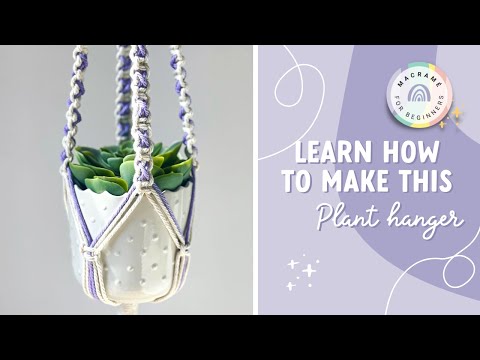
Check out these Easy Macrame Beginner Projects for more inspiration, and read my Shopping Guide for the best Macrame supplies!
Happy Knotting!
Love,
Marloes